Python in Houdini
Also on https://www.youtube.com/watch?v=qP1Jc_9As1c&t=55s
Here I will outline the where (getting the code into Houdini) and the how (hou syntax). In addition, creating a shelf tool, an overview of some syntax and how to create a command line gui in python are given below.
This provides an overview to get you started, please see the above Examples as well.
In Houdini there are many ways to run python code and Houdini is very python friendly. One of the easiest is to create a Python sop. Two other common ways are using the python shell and python source editor (for those of you coming from a mel coding background this one will be most familiar):
- Python Sop tab create a python node - fast and convenient
- Phyllotactic example
- Mandelbrot example
- Mocap Example
- you can set attributes similar to vex setColorPython.hiplc
- Python Shell - similar to an hscript textport shell - runs python scripts by importing or type in commands
- Python Source Editor (under the Windows menu) - stores your python code in the hip file
- Make your own
- Instructions at (Matt Estela and Lucy Tomson) tokeru have an interesting approach
- search for "Make a general python input window"
- they create a null node with a button set up to execute the code. How does this differ?
- from the source editor in that you control when it is executed and
- unlike the shell it is not a live command line. The
- python sop is designed to process geometry however this method allows you to also affect UI
- simple example file
- another example from tokeru.com to create a random color sticky note
- Instructions at (Matt Estela and Lucy Tomson) tokeru have an interesting approach
- Using Python in expressions
- Hscript and Python can co-exist in your parameters. The calls to the hou module sometimes make the expressions look longer.
- In Hscript $F becomes in Python hou.frame()
- local parameters: Hscript $CY becomes in Python lvar("CY")
- Example
- Note that the non-default type will appear in purple and the others in green but they are not broken
- They can co-exist as long as you have the type that you intend to input selected before typing in the expression.
- Python HDA SOP - (NOT RECOMMENDED) there is an excellent example of this in the Mocap Data Parsing Example
- note the above example also talks about callback scripts
- this is probably the least convenient compared to the python sop node
External Commands in Houdini
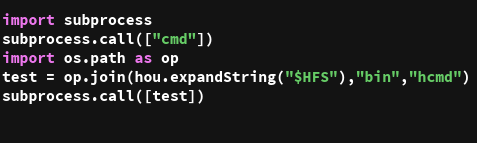
A less frequently used case would be to execute external commands from inside Houdini python scripts. I have created an example which uses both Windows command cmd as well as hcmd from Houdini's bin to demonstrate the syntax. I have then put it into a "Make your own" format as described above.
Example hipnc here. This uses "subprocess" management in python.
Shelf tool
You can add a tool to an existing shell by simply right clicking on the shelf icon area and selecting "New Tool". Probably best to make it in its own shelf tab.
Left click on the + shelf icon and select "New Shelf". Give it a name and label and click accept. Now under this new shelf tab, right click and select "New Tool". Click on the "New Tool" and select the Script tab. You can now enter your code here in Python (alternatively in hscript). This is now accessible from the shelf.
Creating nodes - these will work from a python shell script or in a python source window
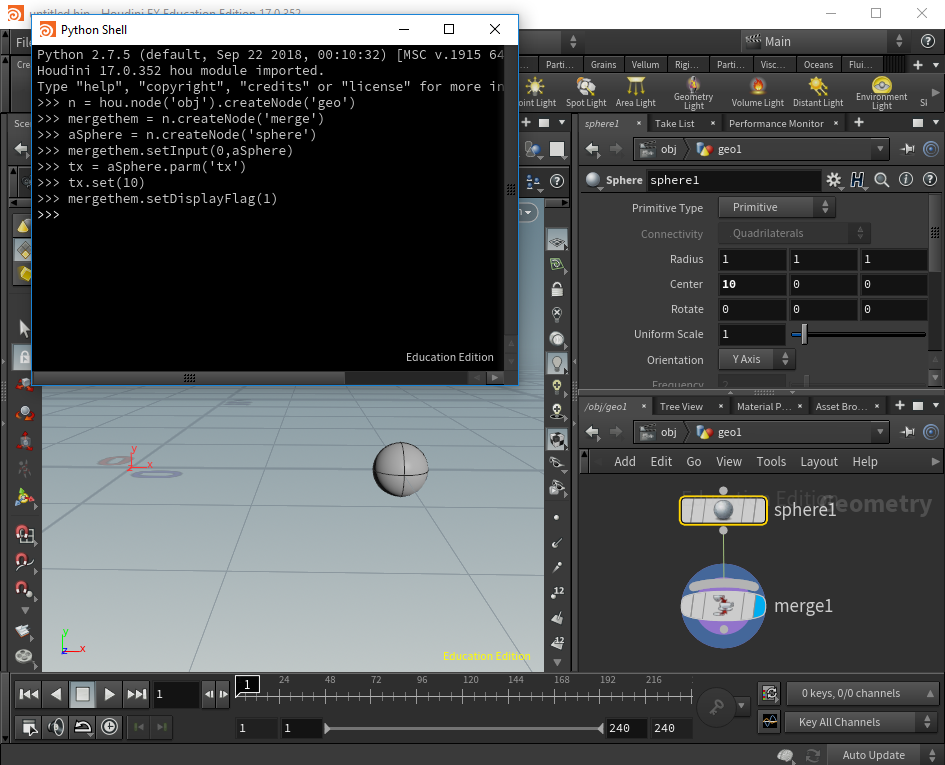
Suppose you want to create some geometry, here is a quick example demonstrating some useful commands:
n = hou.node( 'obj' ).createNode( 'geo ')
mergethem = n.createNode('merge')
aSphere = n.createNode('sphere')
mergethem.setInput(0,aSphere)
tx = aSphere.parm('tx')
tx.set(10)
mergethem.setDisplayFlag(1)
Note that n, mergethem and aSphere are simply variables. In the first line, the hou module, node is the function (method) and 'obj' is the argument to that function. n.path() would give us obj/geo for example. We are then setting a sphere 10 units on the screen. This will give you a sphere node connected to a merge node with the display flag on the merge - so on the scene you will see a sphere at 10 units on the x-axis. For more functions/commands refer to the documentation.
If you wanted to get rid of a node the command for this would be:
someVariableName = hou.node('obj/geo1')
someVariableName.destroy()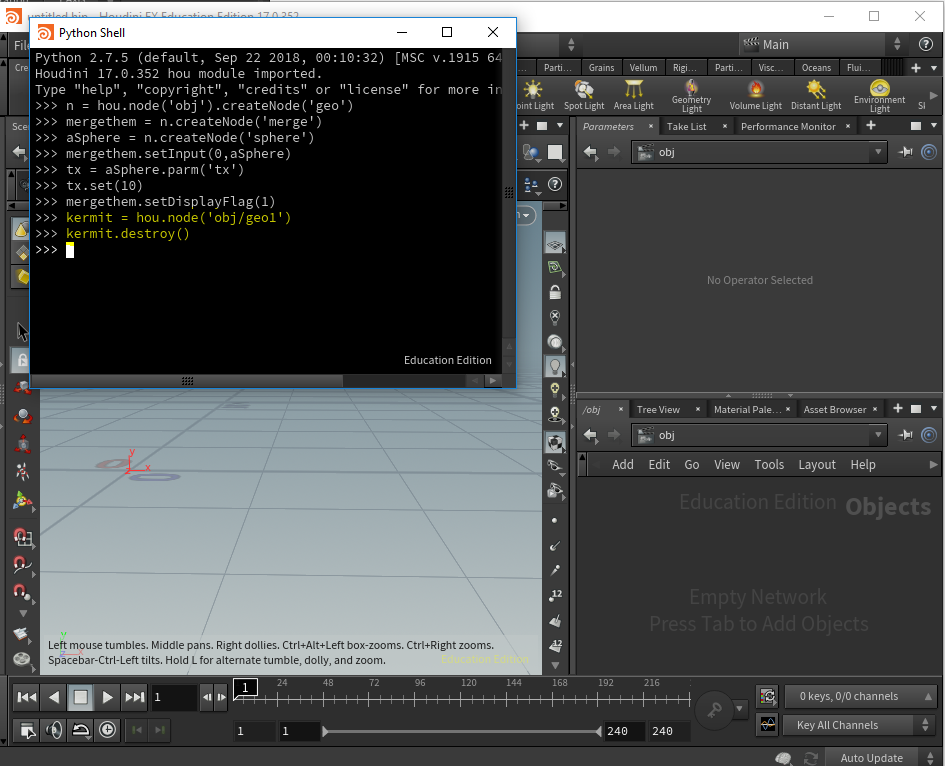
Phyllotactic example using Python Source Window
A version with top level controls using the addSpareParmTuple command which was made clearer thanks to an odforce posting (see below).
- Hip file final result here
- or if you'd prefer to import and run, final .py file here.
Simple GUI in Houdini
See the example file above (final .py file). Odforce posting clarifying addSpareParmTuple command is here
An example of adding a parameter to a node would be (angle is a parameter to my function and geo is set to a node by using hou.node):
angleTemplate = hou.FloatParmTemplate( "angle", "angle", 1, default_value=([angle]), min=0,
    max=360, min_is_strict=False, max_is_strict=False,
    naming_scheme=hou.parmNamingScheme.Base1, disable_when="",
    tags={})
geo.addSpareParmTuple( angleTemplate, in_folder=(["Phyllotaxis Pattern"]),
create_missing_folders=True)More recently (Houdini 19.5.303), I tested this in a python node in obj context - you can see the code in exampleCreatePythonParmViaScript.hiplc