Python in Houdini - Python Shell
Python Shell - similar to an hscript textport shell
- Under Windows select Python Shell - this will open a python shell window
- OR select Windows->Desktop->Technical. This is an excellent default layout which includes a python shell at the bottom middle of the screen.
- You can call functions you have created in the python source editor (using the hou.session prefix) or import .py files
Importing py files
You create files outside of houdini using any text editor. Notepad++ or gedit are two commonly used editors. For example, I have used the phyllotactic pattern example written in python. I have used calls to houdini to create the geometry.
Open up Houdini and set the desktop to technical (or simply open up a python shell under the Window menu). Download the py file and hip file. To run the code in the python shell (make sure you save the files appropriately, and on Windows, launch by double clicking the hipnc). NOTE: if you run houdini from the command line in the directory where the files are, the imports will work perfectly.
import circlehouPhyllo
circlehouPhyllo.phyllocircle(10)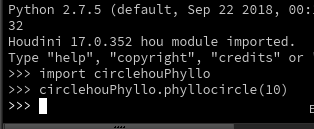
Note when you import this, it creates a compiled python file (.pyc) in your folder.
Alternatively, you can use the Python Source Editor.